Map Elements Photoshop Brushes for Creative Design
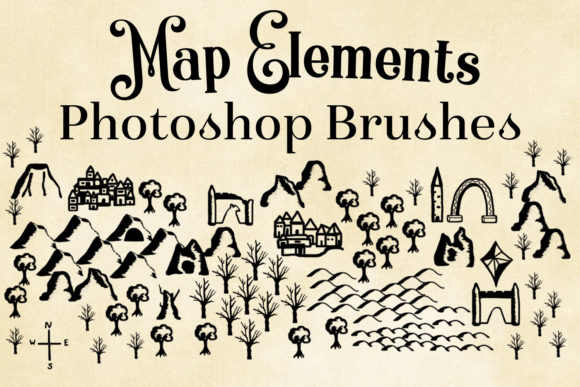
Map Elements Photoshop Brushes is a versatile set of 21 brushes designed for Photoshop CS3 and up. Each brush, from small mountains to hand-drawn compasses, offers a unique element to help you create detailed and imaginative maps. Whether you're a beginner or a seasoned professional, these brushes can enhance your design projects in numerous ways.
Why Use Map Elements Photoshop Brushes?
For beginners, these brushes provide an easy entry point into map design. With pre-made elements like trees, hills, and buildings, you can start creating without needing advanced drawing skills. This makes it perfect for hobbyists and students who are just starting to explore graphic design.
Experienced users and professionals will appreciate the high-quality and detail of each brush. The maximum brush sizes (e.g., smallmountain1 at 2233px) ensure that even large-scale prints maintain clarity and sharpness. This level of quality is essential for professional projects where presentation and detail are critical.
For Creators and Hobbyists
Hobbyists and creators can use these brushes to bring their fantasy worlds to life. Whether you're designing a map for a tabletop game, a novel, or a personal project, the variety of elements allows for endless creativity. For example, using the singletree and tower brushes, you can quickly add natural and architectural details to your landscapes.
For Educators and Students
Educators can incorporate these brushes into their teaching materials to make geography and history lessons more engaging. Students can use them to create visually appealing maps for school projects, enhancing their understanding of spatial relationships and historical contexts. The calligraphicstroke and compass brushes, for instance, can be used to add artistic and navigational elements to maps.
For Business Owners and Marketers
Small business owners and marketers can leverage these brushes to create custom, eye-catching maps for promotional materials, websites, and presentations. The city and city2 brushes, for example, can be used to design cityscapes for real estate brochures or travel guides. This not only adds a professional touch but also helps in standing out in a competitive market.
Installation and Usage
To use the Map Elements Photoshop Brushes, first, extract the .abr file from the .zip file. Then, locate the Presets folder in your Photoshop program directory, and find the Brushes subfolder. Copy the .abr file into this folder. If you have multiple versions of Photoshop, such as 32-bit and 64-bit, repeat the process for each version.
- Extract the .abr file from the .zip archive.
- Navigate to the Presets > Brushes folder in your Photoshop directory.
- Copy the .abr file into the Brushes folder.
- Restart Photoshop to see the new brushes in your brush panel.
Conclusion
Whether you're a beginner, a professional, an educator, or a business owner, Map Elements Photoshop Brushes offer a valuable tool for enhancing your creative projects. With no attribution needed, these brushes provide a flexible and convenient way to add detailed and imaginative elements to your designs. Explore the possibilities and see how these brushes can elevate your work to the next level.